

AION 2 Membership active but gathered materials won't sell?
NC added a gameplay-history check for gathered-material listings. What Membership covers, which restriction criteria remain unpublished and what to save for support.
Published · Updated

If AION 2's Market refuses a gathered-material listing, distinguish general access to the player economy from rejection of a particular sale. The official Launch FAQ explains Membership, while the October patch adds a separate gameplay-history check. Here is what the Global sources establish and what to save if an item cannot be listed.
What Membership covers, and what it does not promise
NC's FAQ describes AION 2 as free to play with an optional monthly Membership. Its monetisation section connects Membership with access to the player economy and currency exchange. That general description does not promise that buying it automatically removes every additional item-listing check.
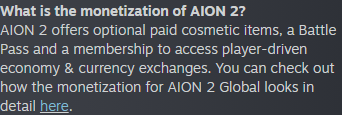
Open NC's Membership explanation at full size. Check which product is active and whether it has expired. Buying it again is not an established way to remove a rejection; the reviewed rules do not give that solution.
What the October 14 patch changed
In the October 13 PDT / October 14 European-calendar patch notes, NC announced a system restricting the listing of gathering materials on the Market based on gameplay history. The Market is the in-game marketplace. Listing means registering an item for sale, rather than gathering the resource itself.

Open the original gameplay-history rule. It names the action, material category and basis of the check. It does not disclose your account's result or explain every rejection message.
Do not expand that rule into “trading is disabled for everyone” or “gathering is forbidden”. If the message appears only when registering a particular item, record that step. One failed operation does not establish the status of all other Market functions.
What level is enough? These sources do not say
The reviewed patch notes and Launch FAQ do not state a required level, playtime, dungeon count, complete affected-item list or restriction-removal deadline. NC uses gameplay history without publishing its assessment formula in these documents.
Advice such as “clear a few more dungeons” remains an individual report unless a condition is confirmed for your version. Another player's successful sale does not reveal the algorithm. Do not buy materials or renew Membership on a promise that a particular action must unlock listings.
A Market rejection does not establish an account ban
Separate three questions: whether Membership is active, whether a particular material can be listed and whether account access is restricted. A sale message alone does not establish a ban. If you cannot log in or receive a separate notification, first distinguish a sanction from a temporary security lock.
Do not substitute one notification for another. A sanction, security lock and rejected operation can have different reasons and review procedures. A general account-restriction announcement does not diagnose your Market message either. Save the exact wording before deciding your next step.
What to send support instead of guesses
Prepare the full message screenshot, exact item name, region, server, attempt date and time. State whether rejection occurred when opening the Market or listing the item. Separately record the active Membership's name and expiry. This is an editorial checklist for describing the case, rather than NC's mandatory form fields.
Open official NC support. If it opens a general page, select the appropriate game or service for AION 2 Global. Describe your notification rather than an assumed algorithm from a discussion. Creating an enquiry may require signing in.
A short enquiry can read: “On server … in region …, attempting to list … produces the message … . My … Membership is active until … . Please explain which restriction this concerns and what is needed for review.” Attach the screenshot and keep the submission receipt so you can find the enquiry in your history.
Until you receive an answer, do not treat another payment, a character change or an arbitrary number of runs as a guaranteed fix. The two reviewed documents provide no such conditions. Published criteria or a review deadline from NC would be grounds to update the guide. The source check was October 18, 2026; Korean and Taiwanese rules are not carried over here.