RAID Inbox rewards can disappear before their timer expires
Not every reward lasts seven days. Check the 400-item limit, different expiry periods and event-reward claiming with two original Plarium screens.
Published · Updated
Plarium’s missing-Inbox-items explanation says rewards can be lost for more than expiry. When the Inbox is full, the game deletes the oldest item to accept a new one. Before another event, check both deadlines and available space.
First check where the reward is
The Inbox is a separate area for items waiting to be collected. Open it using the chest icon at the upper right of the main screen. The arrow in the original below points to that icon, not the Portal or Shop.
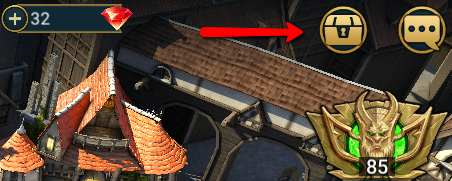
Open the original Inbox-icon screen.
Claiming an event reward and leaving it in the Inbox are different actions. The event and Tournament reward guide says a claimed available reward is immediately credited to the game balance. Champions and Artifacts go to the Inbox if their Collection or Storage lacks space. Do not assume every claimed Energy reward becomes a separate reserve with an Inbox timer.
Seven days is not a universal expiry
Storage time depends on an item’s origin. Plarium gives these examples:
- 100 days: Shop items, Special Offers, and Champions and Artifacts sent because their storage was full.
- 7 days: Event and Tournament rewards.
- 1 day: various quest rewards.
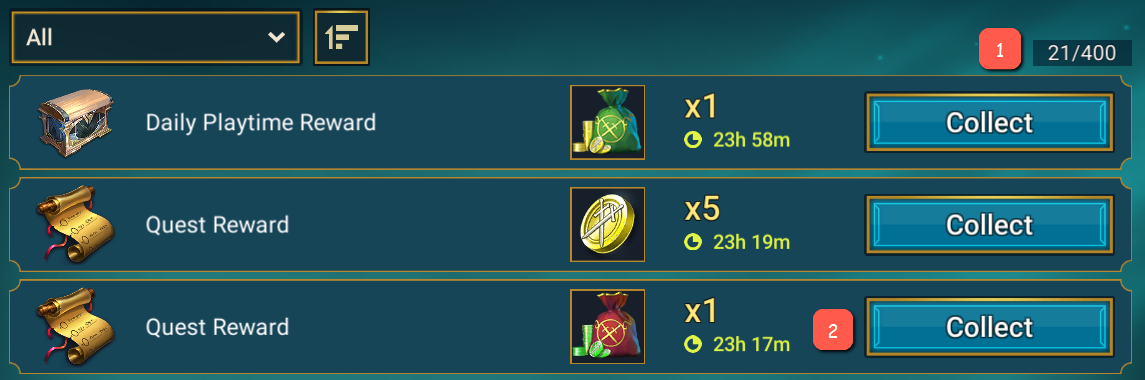
Read the timer on the particular row. The official example shows 23 h 58 m remaining for a Daily Playtime Reward and different times for the other rows. This archived support screen is not your account’s timer or a promise to keep every reward for a week.
Capacity can matter before expiry
The official guide lists capacity at 400 items. When there is no space for a new arrival, the oldest item is deleted. An unexpired timer alone does not protect an item from overflow.
The original marks the 21/400 capacity counter with 1 and the row timers with 2. Check these separately: how many items are stored, and how much time each has left. Before collecting many new rewards, make room and inspect the nearest deadlines.
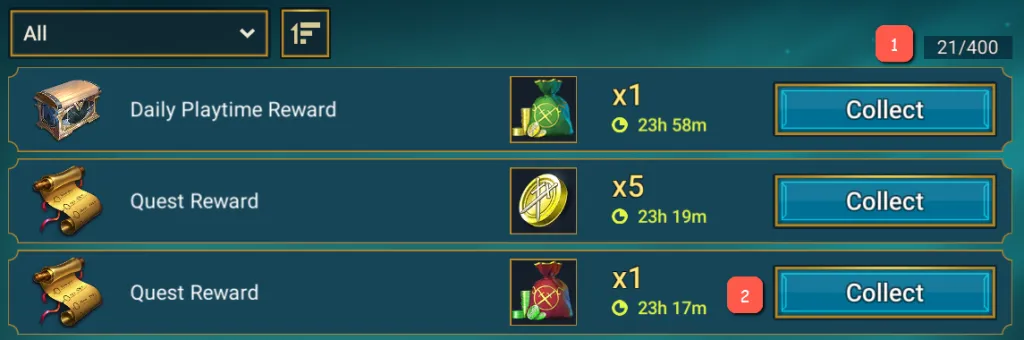
Inspect the counter and timers at full size.
What happens to an unclaimed event reward
For Events and Tournaments, Plarium describes this sequence: rewards unclaimed within 48 hours after the finish move to the Inbox and remain there for the next seven days. This is a limited claim period, not an indefinite extension.
Check the particular activity’s rules before waiting. This guide does not verify separate Ingenious Titan or Frontier conditions or promise to preserve their rewards until a specific Fusion. For an item already delivered, use its actual Inbox timer.
Other resources can have different end-of-event rules. For example, a sufficient Prism Crystal balance is used for automatic summoning; waiting does not preserve all of it. Record where the reward is, its expiry and whether enough space remains. Check before the next large reward delivery, not after an item disappears.