

Viking Rise Quick Train: resource boxes may be used automatically
When quick troop training and promotion can consume Choice Resource Boxes, and what to check before a large sequence of operations.
Published · Updated

The IGG update notes for Viking Rise contain a detail worth checking if you are saving boxes: Quick Train and Quick Promote can use Choice Resource Boxes automatically when the corresponding resource items are insufficient. Before preparing a large number of troops, check both available resources and the stock in your bag.
Two quick actions can use resource boxes
Quick Train trains troops; Quick Promote upgrades them to a higher tier. Choice Resource Boxes is the item name in IGG’s English description. Version 1.5.140, dated 19 August, describes automatic supplementation for these two functions. It is a developer-documented rule; check the cost and prompts in your current client before a large sequence.
A box being in your bag does not itself mean that a quick action will leave it untouched. If you reserved that stock for construction or research, include it in your budget check before confirming troop training.
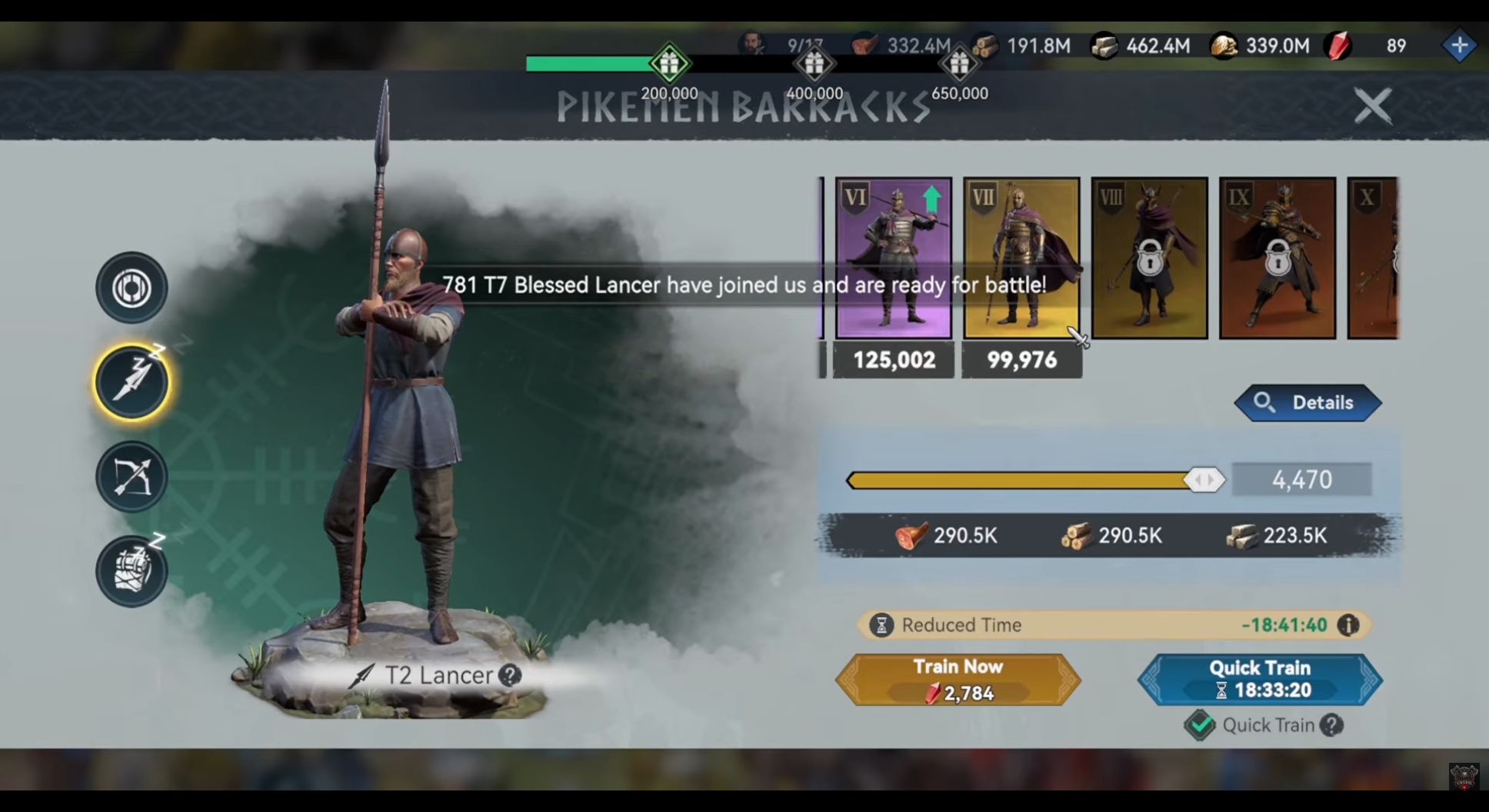
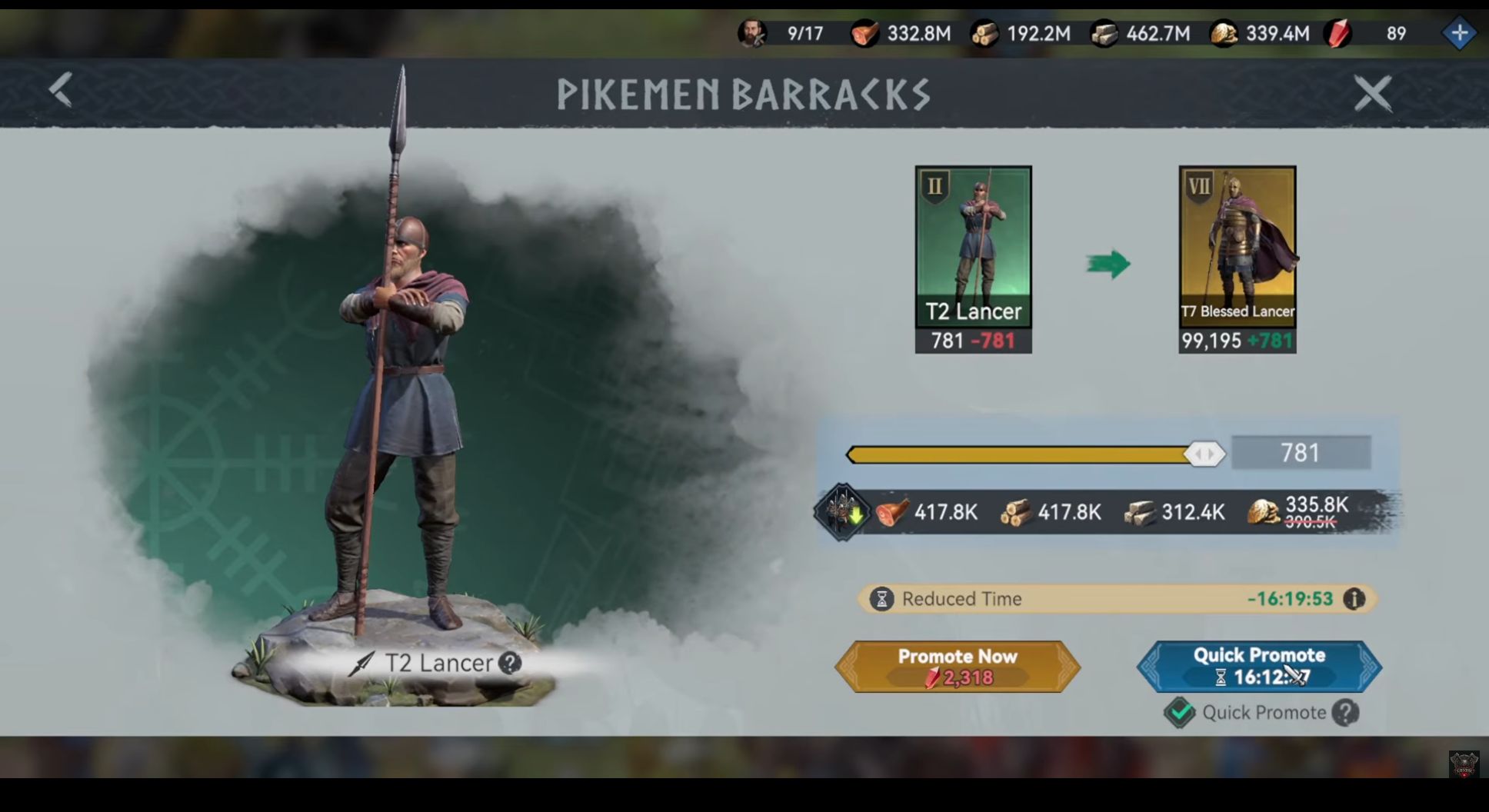
Flóki918’s video published on 3 October shows two separate situations. The promotion screen selects 781 T2 Lancers for promotion to T7 Blessed Lancers, with resource costs and Quick Promote below. The next screen opens T2 Lancer training, selects 4,470 and shows Quick Train. Check the operation, troop tier and quantity together: similar-looking buttons can perform different jobs.
The training cost row shows 290.5K food, 290.5K wood and 223.5K stone. K means thousands. Those figures apply to the selected 4,470 troops in the recording, not every training operation. Use them to locate the right row, then read your own window’s cost.
How to check consumption on your account
Choose a useful operation and a small troop quantity first. Record the relevant resource and box counts before the action, and save the screen showing its costs. If the current interface has a warning or consumption details, read them before confirming.
Keep three separate records: how many troops you want, what the operation window charges and what stock must remain for other tasks. List boxes reserved for your castle or research separately in that last record. This is more useful than comparing your top-bar balance with another player’s.
After one planned operation, reopen the bag and compare the remaining stock. This shows actual consumption on your account. Do not run a large sequence just to test the rule: first establish that the stock needed for other tasks remains available.
Stop if the result differs from your expectation. For support, keep the operation name, troop quantity, client version and before-and-after screenshots. A single reduced counter cannot identify which action consumed the stock.
The two frames below show the buttons and cost rows. They do not show the bag before and after Choice Resource Boxes are opened automatically. IGG’s description confirms the condition; we did not personally test consumption on a game account. Open the training screen at full size or the promotion screen at full size.
Count resource consumption and event points separately
Resource spending does not replace reading an event’s requirements. Our KvK preparation guide explains why owned items and earned points are different quantities. Before training for a reward, open your active stage’s tasks and check which action counts.
A practical order is to choose the improvement you need, calculate its cost and only then include possible points. Another player’s rank does not determine your safe spending limit.
What one patch note cannot tell you
The automatic-consumption note does not explain how different boxes are prioritised. These two screens cannot establish the exact number of boxes spent or the conditions of every other troop action. A checked option labelled Quick Train does not explain all its effects either: read its tooltip in your client. If particular stock must be preserved, compare costs and remaining items before a series of quick operations.