

Free AION 2 server transfer: why you may still be unable to join friends
The October 2026 Global NA/EU transfer windows, destination restrictions, extra character slots and storage checks. A free transfer can still require Quna.
Published · Updated
A free AION 2 server transfer does not guarantee you can join your friends: server type, faction, available slots and dates all matter. The official server-transfer explanation covers those conditions. This guide explains preparation for Global NA/EU using the October 2026 notices; it is not a live destination-availability list.
October 14 or 21: which transfer window applies?
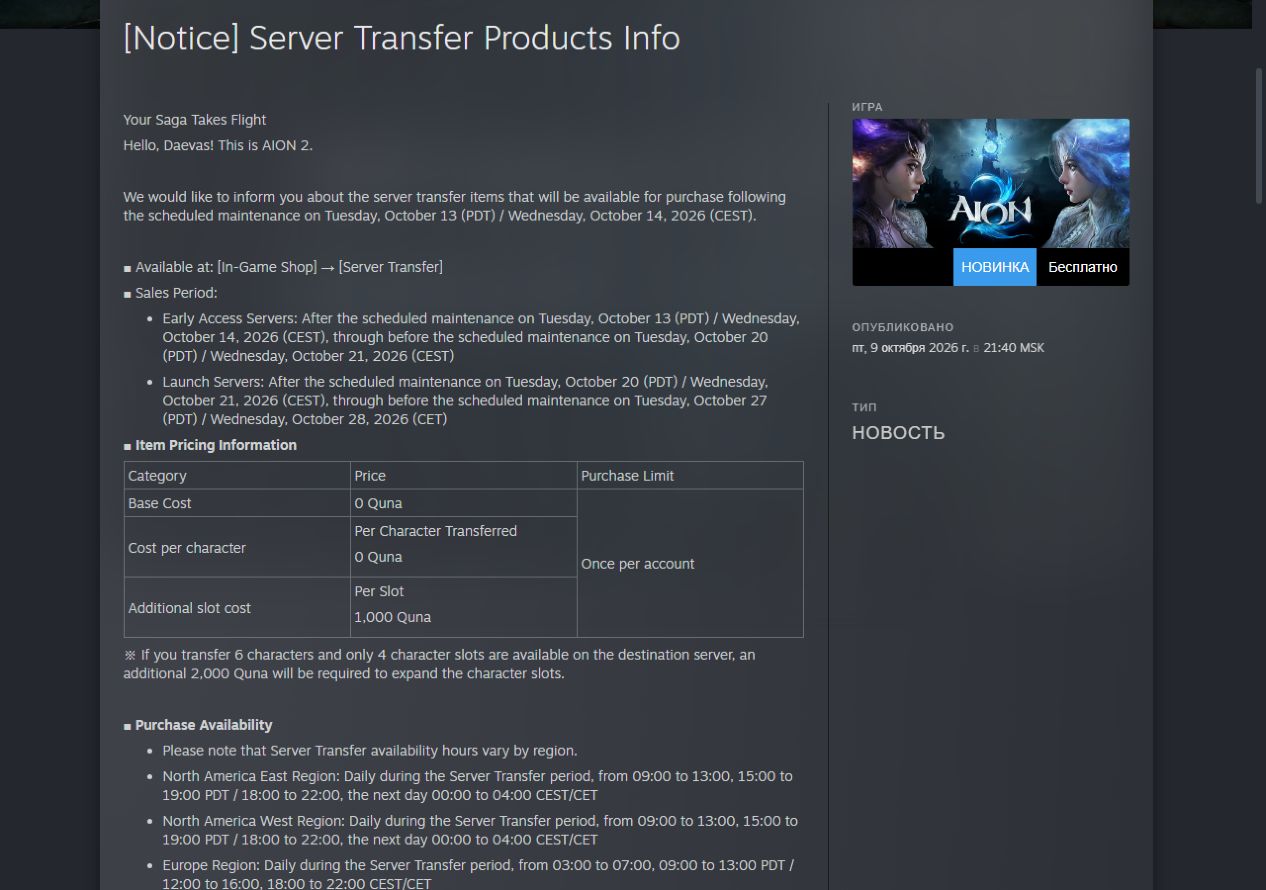
The announced window for Early Access servers ran from after maintenance on October 14, 2026 in the European calendar until before maintenance on October 21. For Launch servers, the announced window runs from after October 21 maintenance until before October 28 maintenance. The same starting dates appear as October 13 and 20 in PDT, the US Pacific daylight time zone.
Check your server group as well as the date. Early Access transfers ended at the October 21 maintenance boundary. Maintenance was scheduled to start at 09:30 Moscow time (UTC+3); the notice checked on October 21 listed 5.5 hours, increased from 4.5. That gave an estimated finish of 15:00 Moscow time. This is the historical plan, not confirmation that maintenance finished or transfers opened then; the notice could change.
NC announced a separate 15:00 Moscow time start for Europe's first round after October 21 maintenance. See the October 21 window and hourly transfer limits for the planned 15:00–17:00 round and why another round does not guarantee capacity.
Why a free transfer can still require Quna
In the official pricing table, the base transfer and each character transfer cost 0 Quna. However, an extra character slot on the destination server costs 1,000 Quna per slot. Quna is the in-game currency used here for slot expansion; it is different from Kina, the character's money.
NC's example transfers six characters to a server with four free slots. Two more are needed: (6 − 4) × 1,000 = 2,000 Quna. If enough slots are already free, no slot-expansion payment is needed. Additional slots purchased on the old server do not transfer with the characters.
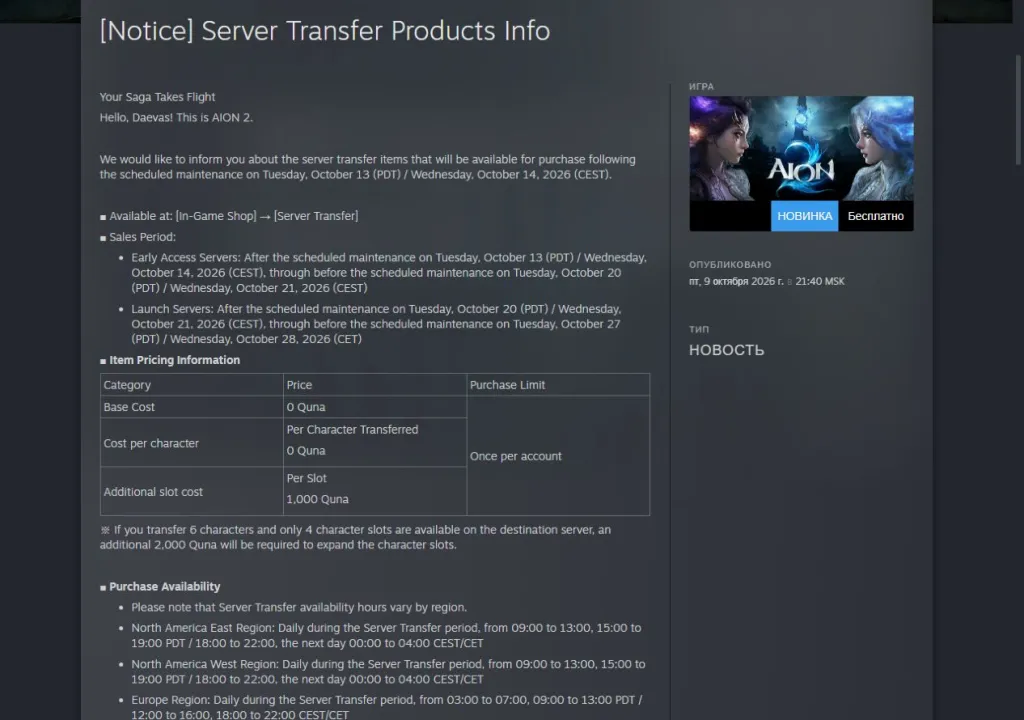
Open the pricing table and dates at full size. On a narrow screen, use the original to check the figures; the calculation is also written above.
What to check before making plans with friends
Transfers are allowed within the same region and faction: Elyos or Asmodian. An Early Access server can transfer only to another Early Access server. A destination may stop accepting transfers because its transfer limit has been reached. Having a character there already does not bypass that restriction.
An account can apply once during the entire transfer period. One application can select multiple eligible characters moving from one source server to one destination. Agree on the exact destination with your friends and check every character before confirming. A completed transfer cannot be cancelled or reversed.
Server Storage does not move with you
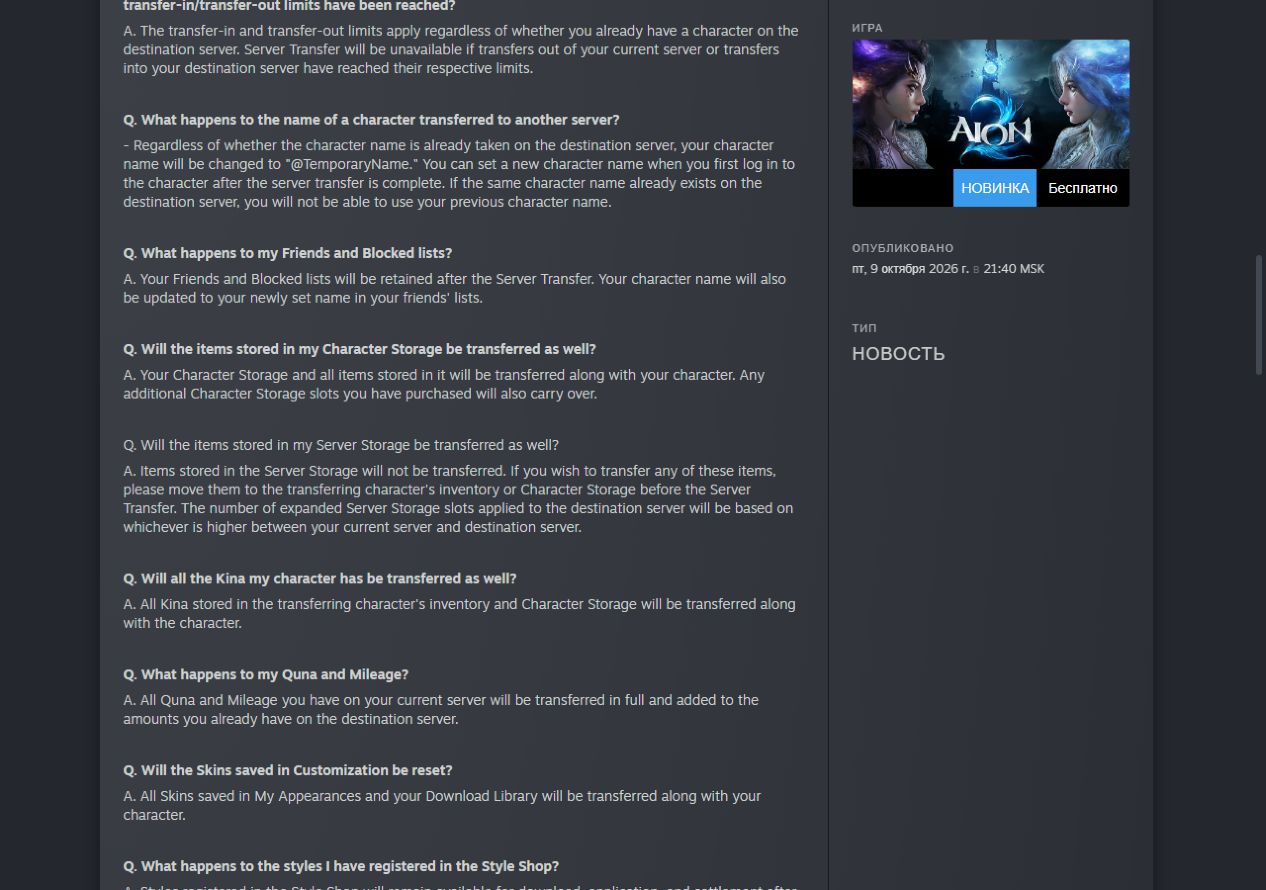
Character Storage transfers with its character. Server Storage is different: its contents do not transfer. Before applying, move the items you need into the character's inventory, called the Cube, or Character Storage. Kina transfers only from those two locations.
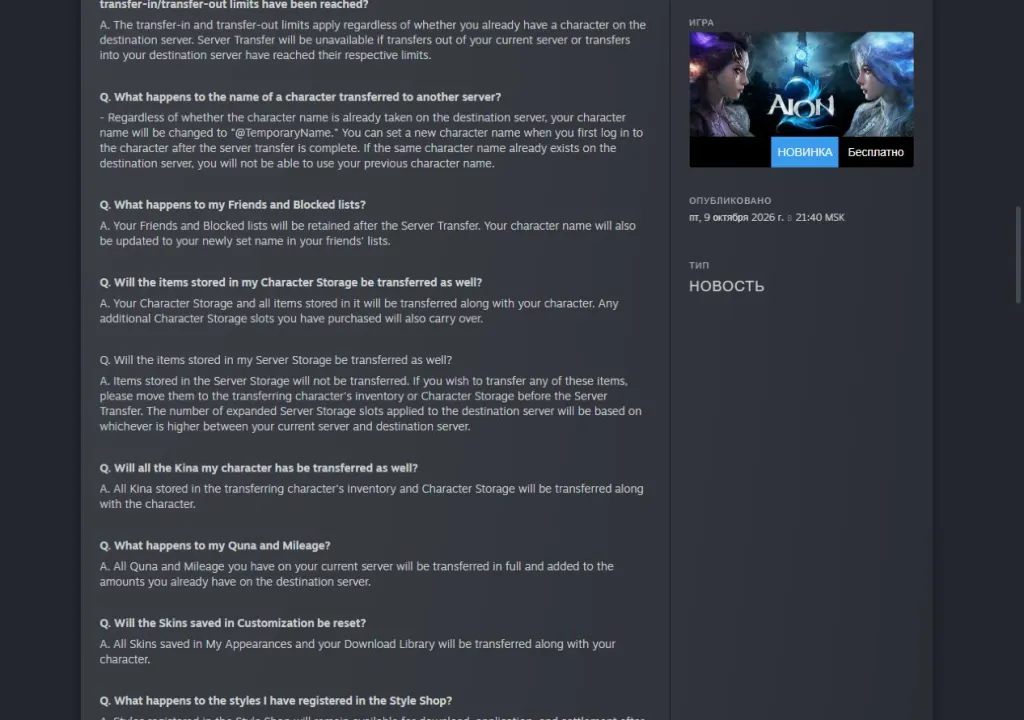
Open the storage and currency answers at full size. This shows the developer's rules, rather than a game-client screen.
A short checklist before applying
If game access is restricted, first establish what kind of restriction it is and how to contact support: how to distinguish a sanction from a temporary security lock. Return to the transfer checks once access has been restored.
Moving during Halloween? The seasonal chest has its own per-server purchase limit: how to obtain the Halloween skin for 250 coins. Do not count on a transfer bypassing it. The Q&A says that Coin Shop products with server-based limits use the higher accumulated counter from the two servers after transfer.
Check that each selected character is at least level 10. Leave your Legion, the game's guild, and cancel any pending application to join one. Complete active Duty Missions. Apply from a village, rather than a dungeon, the Abyss or a Rift.
Claim items and proceeds from the Market, purchases from Shop Storage and available attachments from the Character Mailbox. Recount free destination slots and move needed items out of Server Storage. On the first login after transfer, you must choose a name: the system assigns a temporary one, and a name already taken cannot be reclaimed.
Work through the checks in order: the right window, an available server of your faction, enough free slots, then prepared characters and belongings. A zero transfer price cannot resolve a failed condition. Reread the current rules before confirming. This guide translates the October 9 announcements and the Q&A updated on October 20, with the maintenance-plan correction checked on October 21, 2026; it does not confirm live availability.