

A panda for watching: how to claim AION 2 Twitch Drops
Rewards for 1–8 hours of viewing, why a Steam reward can go to another NC account, and how 4 November differs from the claim deadline on 18 November.
Published · Updated
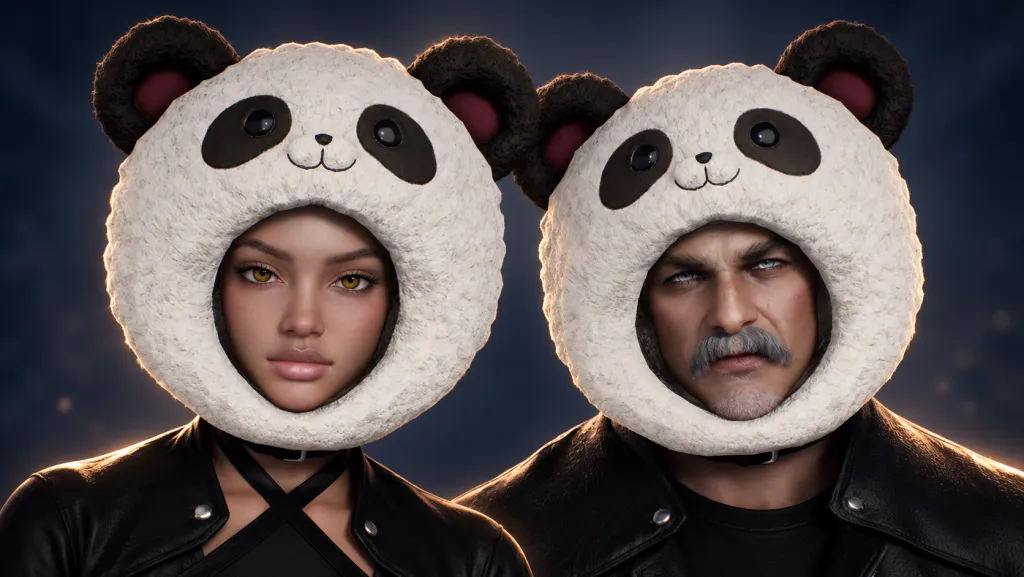
AION 2’s Halloween Twitch Drops campaign offers Chubby Panda (Helm), a panda-shaped headpiece, plus four other reward types for watching streams. Finishing a stream requirement and receiving an item in the game are separate steps. In its official AION 2 Twitch Drops explanation, NC specifically asks you to check the linked account before claiming: a Steam player’s reward can go to a different NC account linked earlier.
What watching earns you, and where the panda fits
NC’s Global Halloween Twitch Drops announcement dated 28 October lists five Watch Time tiers: 1 hour — Resurrection Spiritstone (Bound) ×15, resurrection stones; 2 hours — Appearance Change Voucher (Bound) ×1; 4 hours — Customization Voucher (Bound) ×3; 6 hours — Odyle Energy (Bound) ×4; 8 hours — Chubby Panda (Helm) ×1. The English names help you match each reward to its card in your Twitch inventory.
The panda is specifically labelled Helm, an item worn on the head. It is not a pet or a complete costume. The two voucher names also differ: three Customization Vouchers are not three extra Appearance Change Vouchers. Bound is the item-binding label.
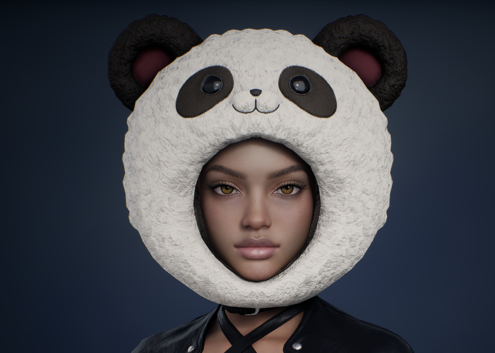
Open the official Chubby Panda appearance at full size. The image shows the headpiece itself; the announcement’s table, rather than the appearance image, establishes the viewing requirements.
These hours are the conditions stated in NC’s announcement. Check your current progress, available Drop and claim button in Drops Inventory, Twitch’s reward inventory. Time spent with a tab open does not prove that every condition is complete: what matters is credited progress for the specific campaign.
Check the account first, especially when playing through Steam
Open the official AION 2 Twitch Drops page and use Link Your Twitch Account. NC explicitly tells Steam players to select the Steam icon when linking. Before confirming, make sure you are signing in to the intended game account.
NC warns in FAQ item 7 that if another NC account was previously connected to Twitch, the reward will be delivered to it instead of your Steam account. Check the link on NC’s official site under My Page → Manage Login. This is your personal page and login management; verify the account itself, not the selected streamer’s nickname.
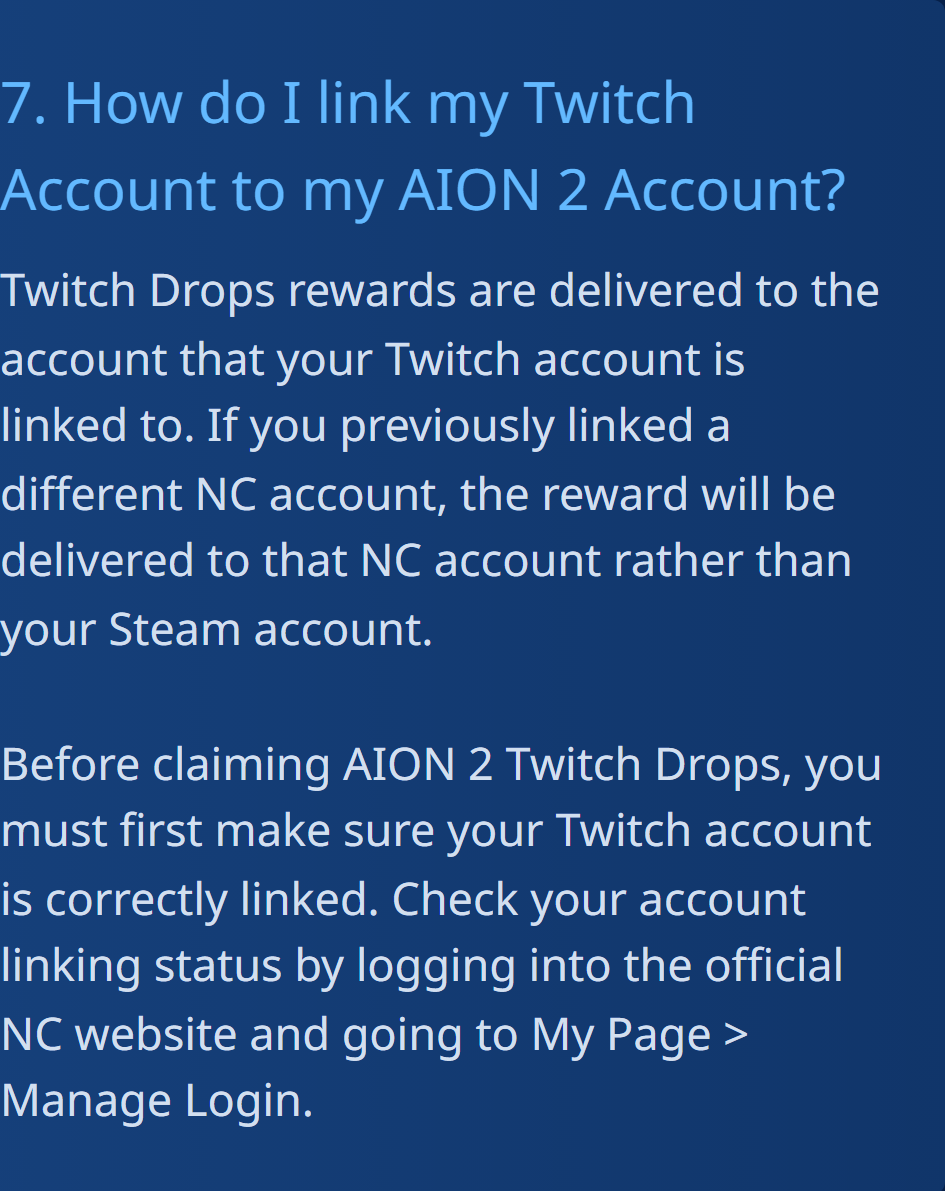
Open NC’s original warning about a different linked account. Check this before Claim, the command that collects the reward. We did not sign in to your account or change its links.
Watching, Claim and delivery are three steps
The announcement says All Channels, referring to participating AION 2 broadcasts. Choose a live stream with Drops enabled and check that the campaign counter starts moving. Twitch’s guide to earning Drops says recordings, reruns and clips do not count. Opening several channels at once does not speed up progress: Twitch counts one channel at a time.
Once the requirement is complete, click Claim in the notification or Drops Inventory. If you missed the chat message, open the inventory yourself. NC allows you to switch participating channels and keep watching; you do not have to stay with one streamer throughout. Check the reward’s inventory status after completing each requirement.
A claimed status on Twitch is still different from the item appearing in AION 2. The FAQ limits this campaign to Global servers; Korea and Taiwan do not participate. If you have claimed the Drop and checked the account but it has not appeared on Global, NC directs you to AION 2 support. Save the campaign and item names and a screenshot of the Claim status; the Halloween announcement does not promise an exact delivery time.
Do not confuse the viewing deadline with the claim deadline
Halloween Drops can be earned from 28 October, 20:00 to 4 November, 10:59 Moscow time. The original gives 28 October, 10:00 PDT → 3 November, 23:59 PST; the European line is 28 October, 18:00 → 4 November, 08:59 CET. Conversion to Moscow accounts for the change from PDT to PST: add 10 hours to Pacific time at the start and 11 at the end.
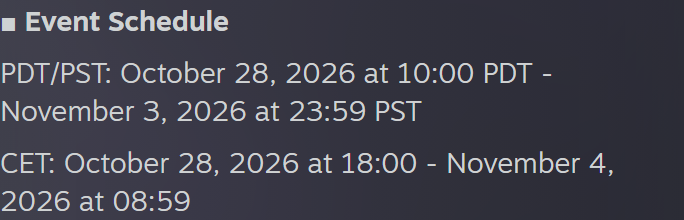
Open the original viewing schedule. Watching after that window closes cannot complete missing progress.
A separate Important Note asks you to claim Twitch Drops from the inventory before 18 November, 10:59 Moscow time: 17 November, 23:59 PST / 18 November, 08:59 CET. This later deadline is for collecting rewards already earned, not extra viewing days. The practical approach is to click Claim as soon as a reward is ready.
The four Odyle items in the 6-hour tier belong to this Twitch campaign. Do not add them to every daily mail reward or apply the weekly Odyle purchase limits of 4 per character and 16 per server to them. For other Halloween rewards, see the separate guide to the skin from a chest costing 250 pumpkin coins: watching Twitch is not the same as earning coins by signing in to the game.
Checked on 29 October 2026 against the Halloween announcement, NC FAQ and Twitch help. Before watching, confirm the campaign name and intended account; before closing the inventory, check the Claim status. Actual delivery to a game account was not tested in this review.